
Mark and report/The film
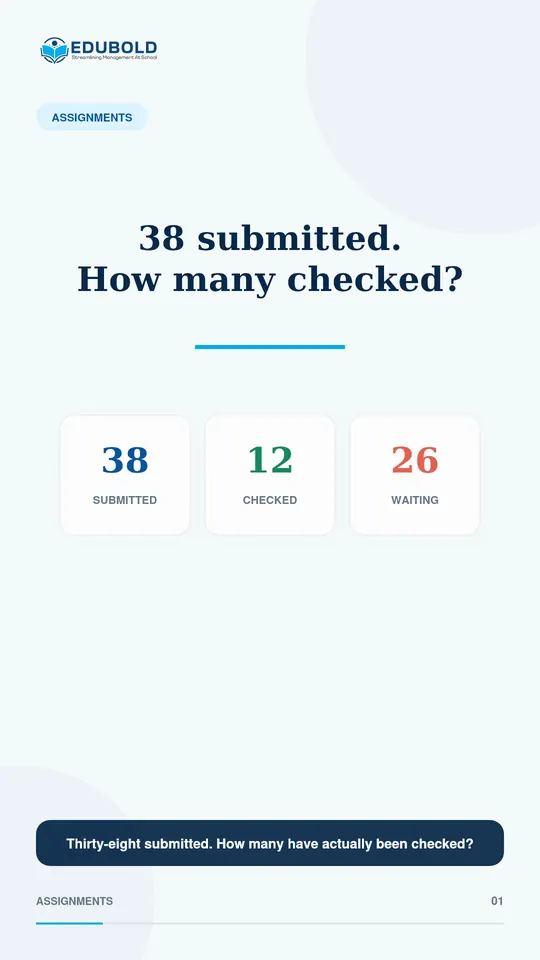
38 submitted. How many were actually checked?
EduBold gathers the submissions nobody has reviewed yet into one queue, so teachers and coordinators can see the work still waiting. Each one is opened, reviewed and cleared as it is handled.
Mark and report/The problem today
Submitted is not the same as checked.
Thirty-eight students handed the work in. The class list shows who submitted, and it says nothing about whose work has been looked at.
So the teacher works down the rows one by one, and the coordinator can only guess how much is still waiting.
Nothing sits unmarked.
Mark and report/In the film
The same class, counted.
- Submitted38
- Checked12
- Waiting in the review queue26
Mark and report/What EduBold changes
From handed in to reviewed.
- Students submit.
Work comes in against the assignment with a file upload, and late submissions are picked out automatically.
- Open the queue.
Every submission still waiting for review is in one place, counted by assignment and by class.
- Review the work.
Give points out of the maximum, with written feedback. EduBold records who reviewed it, and when.
- Clear it.
A reviewed submission leaves the queue, so the count shows only what is still waiting.
What EduBold does here
- Shows every unreviewed submission in one queue
- Counts total, submitted and unreviewed work for each assignment
- Picks out late submissions
- Records who reviewed each submission, and when
Mark and report/Questions
What a school asks about this.
Can a coordinator see the workload across classes?
Yes. The queue counts unreviewed submissions by assignment and by class.
Does EduBold record who reviewed the work?
Yes. Each review records the reviewer and the time.
Can students submit files?
Yes. Students submit with a file upload, and EduBold keeps each student’s latest submission.
Read what the film says
Thirty-eight students submitted the assignment. How many have actually been checked? When submissions sit across class lists, teachers chase rows and coordinators guess what is still waiting. EduBold brings every unreviewed submission into one queue, with counts by assignment and class. Open the queue, review the work, and clear each item as it is handled. No auto-grading. No pretending. Just a visible workload, so nothing sits unmarked.
Mark and report/More films
More from EduBold, under a minute each.
Read the full page, Mark and report. Or see every film.
Next
See it with your own school’s records.
A demo is half an hour, and it runs on your data, not our sample. Tell us this film is the part you want to see, and we will start there.