
Fill your seats01 / 11
Admission season should not require a queue outside your office.
Parents come in person because there is no other way to find out where their application stands. That is the whole reason for the queue. Give them a way to see it themselves and the queue stops forming.
The problem today
The queue forms because there is no other way to find out.
- Forms are collected on paper, then typed into a system by someone in the office.
- A parent rings to ask what is happening. Somebody goes to look in a file.
- The same family applies for a second child and nobody notices until the fee is wrong.
- Documents arrive a few at a time. Nobody can say which application is still missing what.
- A seat frees up in July and finding the next candidate means going through a list by hand.
- The accepted student is then typed in again, as a student this time.

What EduBold changes
The application answers the parent, so the parent stops ringing.
Who
The parent
Your office
01Apply
Fills the form on your own website. It saves as they type, so a flat battery does not cost them the application.
Nothing. No typing, no paper coming in.
02Verify
Uploads the documents, and can see which ones are still missing.
Approves them one at a time, or clears a morning of them at once.
03Decide
Watches the status change, so there is nothing to ring about.
Shortlists, schedules the interview, records the score against the application.
04Offer
Accepts from a phone and pays the admission fee in the same step.
Sends the offer. A decline frees the seat the same minute.
05Enrol
Already done.
One action turns the application into a student record and a login.
The same five stages in detail, for whoever has to run them.
Parents apply on your website, and the form waits for them
The application lives on your own site. A parent starts it, verifies their email, and gets a code to come back with.
The form saves itself as they type. A closed browser, a flat battery, a switch from the phone to the office laptop at night: the application is where they left it. Two parents can work on the same form, and if one has it open the other can take over the lock rather than overwrite them.
They track it themselves, and accept the offer online
Status is visible to the parent at every stage. When the offer comes, they accept it from their phone. If they decline, the seat frees the same minute rather than two weeks later when somebody follows up.
The admission fee can be paid as part of accepting.
The pipeline is a pipeline, not a yes or no
Twenty states, and each of them means something: Enquiry, Application Started, Submitted, Under Review, Document Verification, Verified, Shortlisted, Interview Scheduled, Interview Completed, Fee Payment Pending, Fee Paid, Confirmed, Enrolled. Alongside them, Waitlisted, Rejected, Not Suitable, Cancelled and Withdrawn.
Interviews are scheduled against the application, and the score and remarks are recorded on it. Documents are approved or rejected individually, or in bulk when you are clearing a morning’s paperwork. When something is missing you request the specific document rather than rejecting the whole application.
Four kinds of admission, handled as four kinds
New, Lateral, Transfer and Re-admission. A child arriving in Class 8 from another city is not forced through a first-time admission form, and the record says what actually happened.
When a seat frees, the next candidate moves up
Promote the next candidate from the waitlist. One action. The status changes, the notification goes, and the seat is filled while it is still worth filling.
The accepted student is not typed in again
Converting an accepted application creates the student record and the login in one step. The fee structure attaches from your rules. Student and admission numbers generate to your own format.
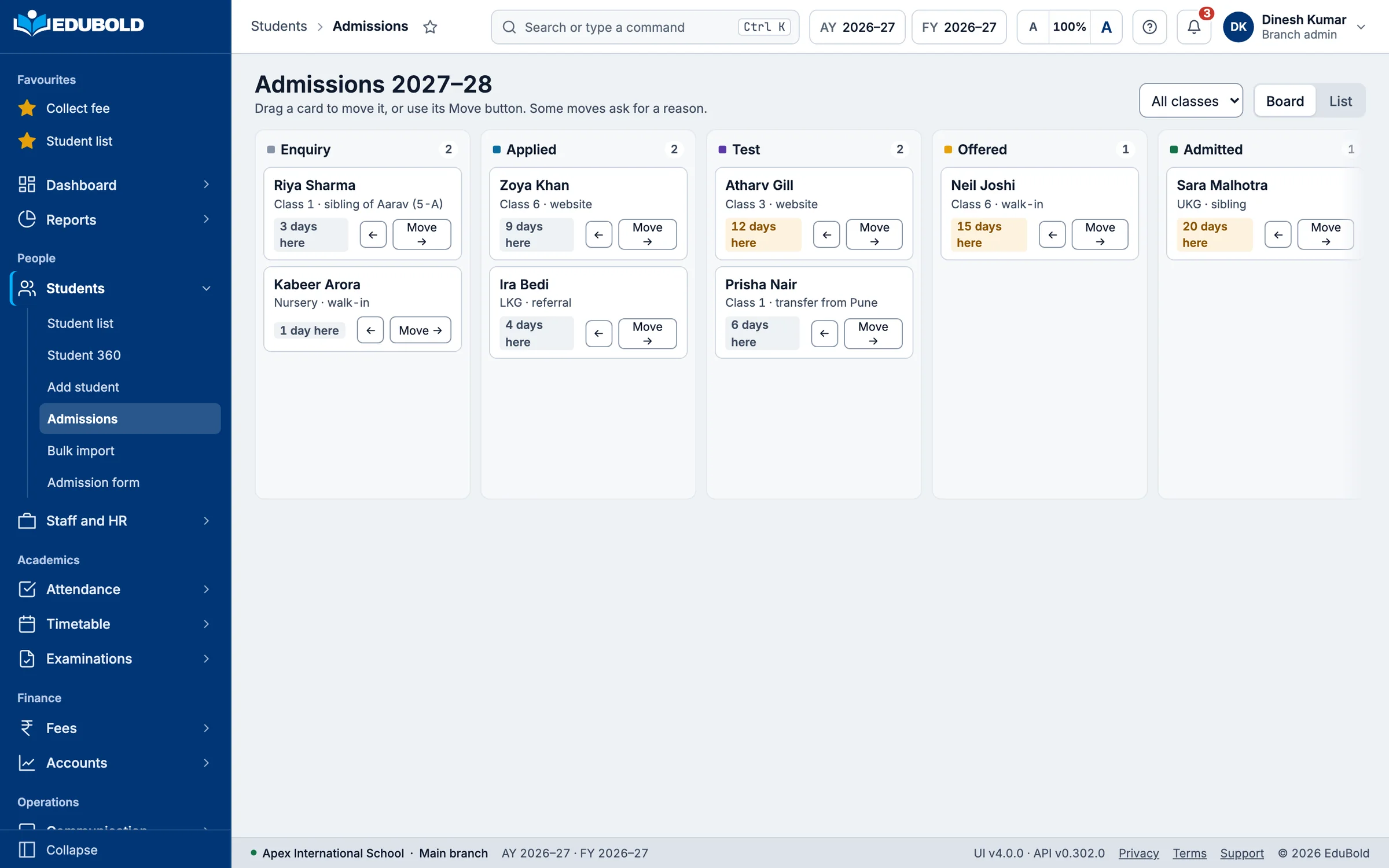
The detail that decides it
EduBold identifies which applicants are siblings.
Every new application is scored against the families already in your school. Phone matching ignores the formatting, so +91 98765 43210 and 9876543210 are the same number.
If it looks like a sibling, the system says so before anyone has noticed.
Confirm the link and the sibling discount calculates itself from the number of siblings and the relationship, then updates every linked record in the family.
You find out when the application arrives. The alternative is the first billing run, when a parent rings to ask why they have been charged full fee for a second child.
Fill your seats/Scored against
- Primary caregiver’s phone number
- Second caregiver’s phone number
- Surname
- Address
For the management committee
Admission is where the year’s revenue is decided.
It is usually the least visible process in the school. Here the pipeline is a set of states you can count. How many applications are sitting in document verification. How many offers have gone out and not been accepted. How long the waitlist is.
Applications also carry the fee consequences forward, so the sibling discounts and concessions that will affect collection are visible at admission rather than at the first billing run.
Bring your admission policy to the demonstration and we will walk your own stages through it, from enquiry to enrolled.
Fill your seats/Short films
See it in under a minute.
Each film opens on its own page, with the worked example, the questions schools ask and the full transcript.
Next
Bring your hardest question.
Half an hour, on the problems your school actually has. Bring the thing your current system cannot do, and you will watch EduBold run it against your own rules before you decide anything.